|
Ez-VIS™
- Vehicle Instrumentation System

CUT THE CORD
to SAVE TIME & MONEY
attaching Ez-VIS™ to a vehicle
instantly enables cost effective wireless OEM diagnostics and wireless telematics just like our industy leading Ez-TAP device with the addition of
sensor inputs, analog inputs, inclinometer, accelerometer, and dgital inputs and outputs
|
Mass Transit Magazine Names Ez-VIS/TPMS one of the top technical innovations of 2010
 What is Ez-VIS?
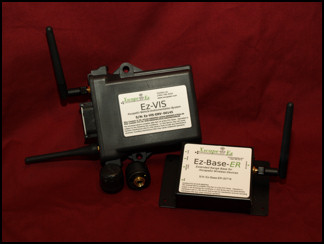
XscapeEz Ez-VIS is a short range wireless automatic vehicle monitoring system and diagnostic unit. It allows a user to collect different information that is critical to reducing costs, maintaining vehicle
uptime, and controlling maintennace issues. Ez-VIS supports both industry standard heavy duty data links, J1708 / J1587 and J1939. Because of the
fact that we use SAE standard messaging and have both data links built in, mixed fleets of trucks can generate reports and information that look the same,
instead of using a different OEM software package for each type of vehicle in the fleet. Ez-VIS can be used in many different applications including:
PM Scheduling and Maintenance Cost Control
Driver Behavior Training
Fuel and Tire Savings Programs
Asset Management and Logistics
What makes up an Ez-VIS system?
Ez-VIS is made up of up to four components including:
1. Ez-VIS Vehicle Module - In a sealed case and capable of mounting inside or outside the cab.
2. Ez-Base Station - small RF device that wirelessly connects the PC to the vehicle module.
3. Ez-TRAC with Ez-Reports Software - XscapeEz intuitive software that automatically collects and reports all vehicles and information
4. External Sensors - Tire Pressure Sensors, temperature sensors, pressure sensors, and more
What does a report look like?
Click here to open an Example Report with tire pressure monitoring.
Download Drivers and
Software
EZ1210 Automated Installation
- Recommended for most users, if you
are unsure use this installation
RF Base Station Drivers
- USB drivers for the Ez-Base™ station
EZ1210 Drivers
- EZ1210 DLL only installation
Ordering Information for Ez-VIS
Ez-VIS is a flexible and modular system that can be used in many applications.
Please contact an XscapeEz Representative today to order your Ez-VIS with the options you need to enable savings today at:
765.795.3319
|
|
|
Copyright ©
2002-2010 XscapeEz Ltd. All Rights Reserved - Where Technology
and Experience Work Together
|
|
